
Monitor
- Introduction
- Monitor is the most commonly used output device on a computer.
- The Monitor is used to display the text and the graphic image when you process the data.
- The most commonly used desktop displays are Cathode Ray Tube (CRT) technology and the Liquid Crystal Display (LCD).
Classification of CRT Monitor
- Curved Screen and Flat Screen
- The surface of the screen where the image is displayed is flat in case of a flat screen.
- Monochrome and Color
- It is capable of displaying only two colors.
- Color monitors can be used to display 16 to 1 million colors.
- Transistor Transistor Logic (TTL) and Composite Monitors
- It uses digital signals for display.
- Composite monitors have the Sync pulses and the video information from the display adapter to be mixed together.
Structure of the cathode ray tube (CRT).
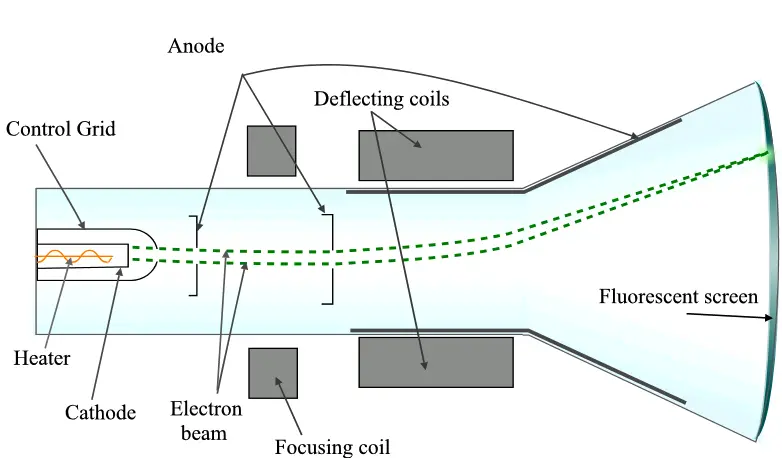
Components of CRT monitor
- The cathode ray tube consists of the following components.
- Electron Gun
- Deflection coils
- Fluorescent screen
- The electron gun consists
- Heater and a Cathode for generating electrons
- Control grid to control the brightness by controlling the flow of electrons
- Two anodes namely the focusing anode and the accelerating anode
- The focusing anode is used to focus the electrons on to the desired spot on the screen.
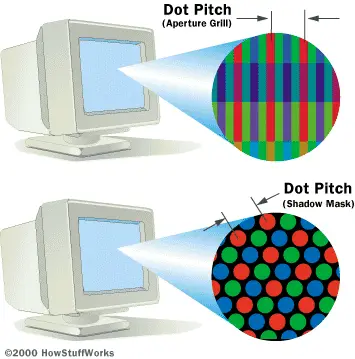
Shadow Mask
The electron beam passes through the holes to focus on a single point on the screen which is coated with phosphorus.
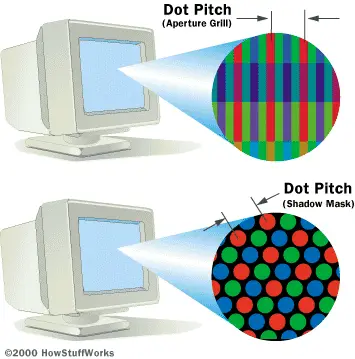
Aperture-Grill
- In the aperture grill method instead of a metal mesh, metal stripes are used.
- Slot Mask
- The slot mask technology is provided with vertically aligned slots.
Types of Scanning
- Vector scan
- Vector images are identified by their vertices and the image is drawn by joining the points.
- Raster Scan
- The raster scan method, horizontal and vertical scan signals are generated to move the electron beam in the forward and the backward direction.
- The raster scan technique can be classified into two types.
- Non Interlaced Scanning
- Interlaced Scanning
- Non-Interlaced
- Interlaced
Monitor Specification
- Screen size
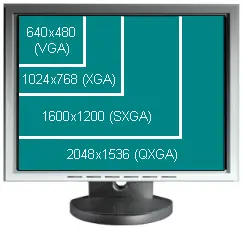
- The size of the monitor affects the resolution of the display.
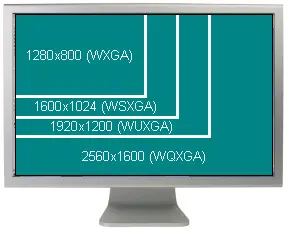
- Resolution
- Defined as the number of pixels called picture elements that can be displayed on the screen.
Scanning Frequencies
- Horizontal scanning frequency
- Vertical Scanning Frequency
- Video Bandwidth
- It can be referred to the number of dots that a monitor can display in a line in one second.
- Power Requirement
- Monitor requires Alternating current and hence can be connected directly to the AC power supply.
LCD Monitors
- The flat panel monitors use LCD technology.
- The LCD technology can also be used for producing color display.
- Passive Matrix Display
- It is a display technology used by portable computers.
- Here, the parallel wires run both horizontally and vertically.
- The voltage control in a passive matrix display is not precise.
Active Matrix Display
- Active matrix display is based on Thin Film Transistors technology.
- Here, there are small switching transistors and capacitors.
- The components are placed in glass substrate.
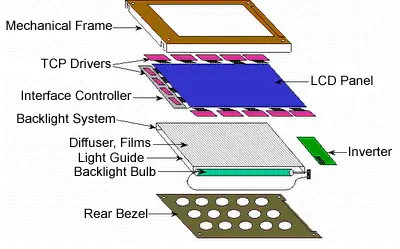
Components of an LCD module
- LCD Panel
- Controls the light throughput using the Liquid Crystal material.
- Interface Controller
- Two different types of interface:
- 1. Analog and 2. Digital.
- Backlight System –
- It is a source of consistent uniform light.
Inverter
- The voltages and the current needed by the LCD unit is given by the inverter Mechanical Frame
- The mechanical frame determines the weight of the system.
The Main Difference Between LCD and Crt
| Liquid Crystal Display (LCD) | Cathode-Ray Tube display (CRT) |
| Compact | Heavy |
| Low power (c.20w) | High power (c.150w) |
| Perfectly sharp | Limited sharpness; tend to blur more at high brightness, and with age |
| Perfect image geometry | Tend to suffer from geometric distortions, which may be picture (brightness) dependent, and worsen with age |
| Excellent text contrast | Poor text contrast (bandwidth limited) |
| Do not normally flicker | Inherently flicker (although peoples sensitivity varies) |
| Contrast/color change with viewing angle | Consistent image irrespective of viewing angle |
| Poor black on dark images | Good blacks (quality monitor, properly adjusted) |
| Liquid Crystal Display (LCD) | Cathode-Ray Tube display (CRT) |
| May cause motion-blur | Usually portray motion well |
| May have or develop "stuck" pixels | Not pixel-based, no problem |
| Fixed inherent resolution | Support multiple resolutions equally well |
| Maturing technology; cost falling | Mature technology; cheap |
| NATIVE INTERFACE WOULD BE DIGITAL (EG. DVI) | Naturally suited to analog interface |
| Image can be sub-optimal with analog interface | Naturally suited to analog interface |
Display Adapters
- Overview
- Display adapters are used to produce output in the system.
- It transfers data on to the screen.
- The display adapter can be used to display alphabets, numbers and special characters.
- It can also be used to display images and figures.
- Introduction
- Display adapters are essential components in a computer for producing output. It help the end users to transfer the data on to the screen.
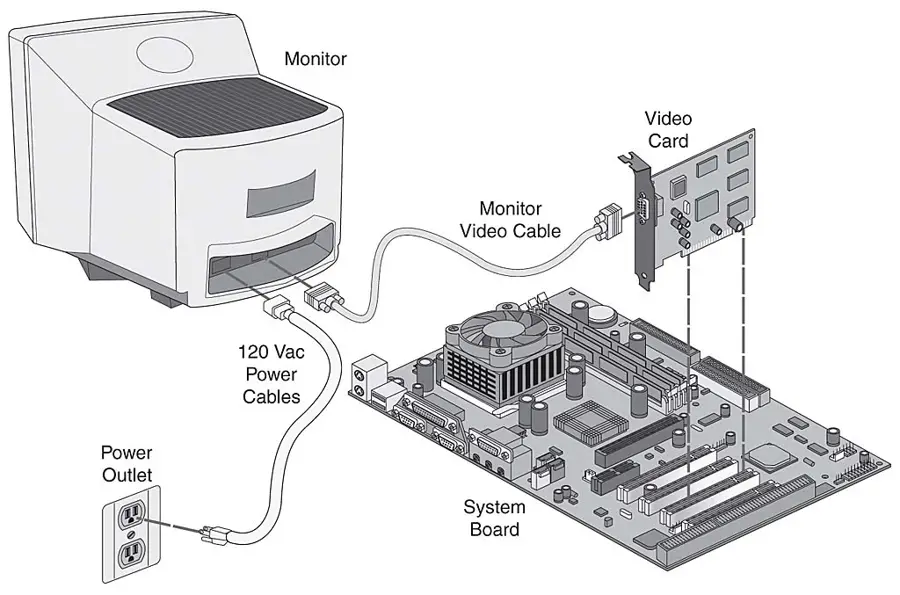
- The display adapters are the video cards, which are used to connect to the system unit.
Display Modes
- Text Mode
- The display adapter is designed to display only the characters and the shapes.
- Each character is identified by an ASCII code.
- The adapter receives the code from the computer and translates them for displaying them on to the screen.
- Graphics Mode
- In this mode, each dot on the screen display is made of pixels.
- Pixel is the smallest amount of data used to represent an image.
Components of Display Adapters
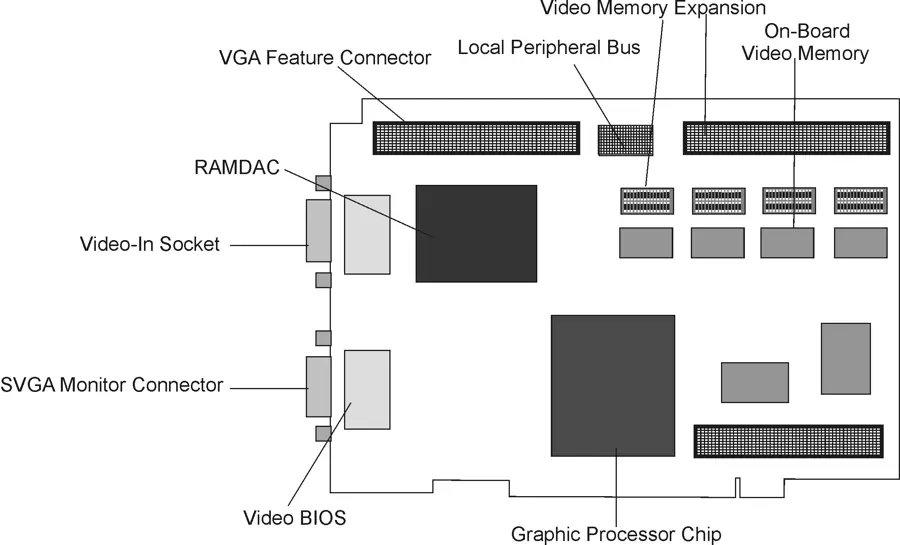
- Major components of a graphics adapter
The Hardware components that make up the display system are shown below.
Components of Display Adapters
- Graphics Processor
- The onboard graphics processor will be able to perform different operations like bitmap transfer and painting, window resizing and repositioning, font scaling, line drawing, polygon drawing etc.
- Video Memory
- It is a component in the display adapter, which is used to store the video image.
- The different memory technologies are, Video RAM (VRAM)
- Windows RAM
- Edo dram
- SDRAM
- SGRAM
- Direct RDRAM (DRDRAM)
Random Access Memory Digital to Analog Converter (RAMDAC)
- It reads the contents of the video memory and converts the digital information into analog RGB signals and sends it over the video cable to the monitor.
- The RAMDAC can determine the range of refresh rates supported by the processor and the number of colors that could be available for a given resolution.
- Driver Software
- It acts as an interface between the monitor and the display adapter.
- The performance of the display on a monitor greatly depends on the driver software.
Connectors
- The types of connectors used to connect a display adapter to the monitor.
- 9 pin D type connector in a Digital Adapter such as MDA, CGA etc.
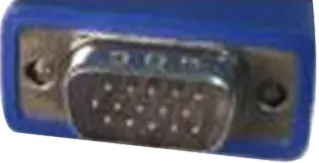
- 15 pin D type arranged in three rows such as VGA, SVGA, AGP adapters
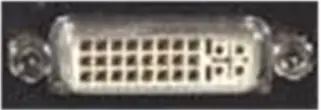
- DVI (Digital Visual Interface) Connectors
- Three types of DVI connectors are DVI-A DVI-D DVI-I
- Analog
- DVI
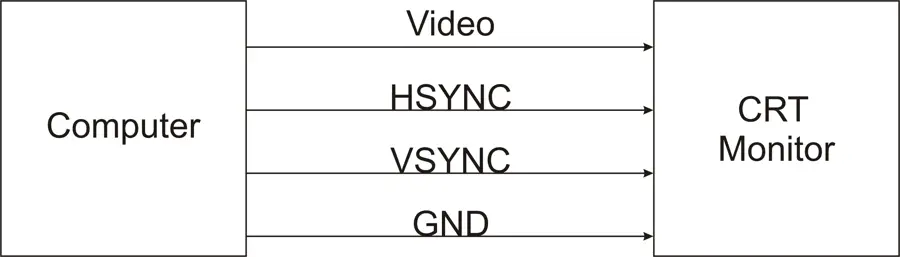
Types of interfaces used to connect to a CRT monitor TTL Video Interface
- It is a digital interface where the signals can be either zero or one.
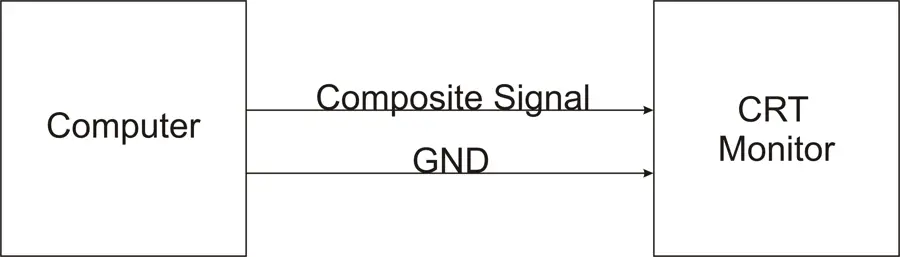
- Composite Interface
- The three signals are combined and are sent in a single wire. It has signals in either analog or digital form.
Video Adapter Specifications
- Screen Resolution
- It refers to the number of pixels that is used to create an image.
- The size of the monitor
- For instance, 1024 x 768 resolutions appear to be perfect on a 17-inch monitor.
- Color Depth
- For a color display, we need more than one bit to represent one pixel of information, which is called as color depth.
- The most general resolution used in recent days is 640x480 at 16 colors.
3D Acceleration
- It permits the programs especially games, where the screen image must be recomputed many times per second.
- Full Motion Video
- Some software packages are shipped with video segments for better understanding of the instructions.
- Most of the games use the video file format to make it more cinematic.
- It enables to watch TV on the Windows screen.
- Video Card
- The game dependent software fully relies on the quality of the video card for frame rate and smooth animation.
Display Standards
- Monochrome Display Adapter (MDA)
- It can print only text and does not support graphics.
- Color graphics adapter
- It can be used to display in Red, Green, blue and the combination of these colors.
- Video Graphics Array (VGA)
- It offers 16 color at 640x480 as the default resolution.
- Super Video Graphics Array (SVGA)
- It is a standard used by monitors and display adapters.
- The maximum resolution supported is 800x600.
| Liquid Crystal Display (LCD) | Cathode-Ray Tube display (CRT) |
| May cause motion-blur | Usually portray motion well |
| May have or develop "stuck" pixels | Not pixel-based, no problem |
| Fixed inherent resolution | Support multiple resolutions equally well |
| Maturing technology; cost falling | Mature technology; cheap |
| NATIVE INTERFACE WOULD BE DIGITAL (EG. DVI) | Naturally suited to analog interface |
| Image can be sub-optimal with analog interface | Naturally suited to analog interface |
| Liquid Crystal Display (LCD) | Cathode-Ray Tube display (CRT) |
| May cause motion-blur | Usually portray motion well |
| May have or develop "stuck" pixels | Not pixel-based, no problem |
| Fixed inherent resolution | Support multiple resolutions equally well |
| Maturing technology; cost falling | Mature technology; cheap |
| NATIVE INTERFACE WOULD BE DIGITAL (EG. DVI) | Naturally suited to analog interface |
| Image can be sub-optimal with analog interface | Naturally suited to analog interface |