
Power Supply
- Overview
- Electronic equipments require power supplies producing low voltage at different levels.
- This module deals with two major components involved in power supply
- One of them is the Switch Mode Power Supply (SMPS) and the other is Uninterrupted Power Supply (UPS).
Switch Mode Power Supply
- Introduction
- The SMPS is used to give DC voltage to the components present in the motherboard.
- It is used to produce different DC voltages necessary to drive the various components like the processor, the hard disk, floppy drive, the processor fan etc
Classification of Power Supplies
- The power supplies can be classified into two types Linear Power Supply - LSP
- Switch Mode Power Supply - SMPS
- Linear Power Supply
- The linear power supplies dissipate more power during the conversion process.
- As a result the process is inefficient and requires a large heat sink to cool the system.
- The example of a linear power supply is the battery adapter
Switch Mode Power Supply
- The switch mode power supply uses a transistor switch and a closed feedback loop to generate DC output.
Various components in SMPS are Primary Rectifier Primary Filter Solid state Switch Transformer Secondary Rectifier Secondary Filter Sensing/Switching Circuit
Output DC Voltages
- Various DC Voltages are
- +12V DC – Drive Motors and Fans
- -12V DC – Serial Ports
- +5V DC – All ICs (Integrated Circuits)
- -5V DC – Core Memory
- +3.3V DC – Power Good Signal
- +12 v
- +12 V is used to drive the disk drive motors. It is also used by components like fans and other cooling devices.
-12 V
- The RS-232C interface of the serial port follows the Negative logic.
- This voltage is provided to the motherboard to power up the serial port +5 V
- All the integrated components of the motherboard operate with +5V.
- Hence the motherboard is provided with +5V power supply.
+5 V
- -5V is used to provide the power for core memory.
- +3.3 V (Power Good Signal)
- To prevent the computer from operating prematurely a power good signal is generated to indicate that the power obtained is proper and can be given to other devices on the motherboard.
ATX Power Connector
- ATX Power Connector
- A 20 pin Main Power Connector for the standard ATX power connector.
- A 4 Pin +12V power connector for the Pentium 4 processor based systems.
- A 6 pin AUX power connector used for the motherboards operating at 250W or 300W.
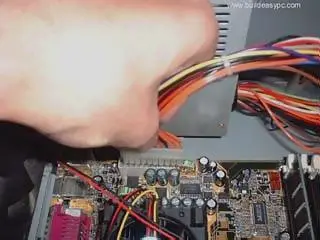
- The ATX power connector and the ATX socket are shown in picture.
AC Adapters
- AC Adapters
- Portable computers use a different kind of a power supply since they cannot use power from the Wall power outlet all the time.
- Line Conditioners
- Line conditioners are used to filter and smooth the power stream by minimizing the fluctuations and the variations and interference caused by the power.
Uninterrupted Power Supply - UPS
- Overview
- Uninterrupted Power Supply (UPS) is necessary for critical and uninterrupted functioning of the computers.
- The advantages are
- It offers protection against small surges.
- The unintended signals like noise are removed from the power supply given as input to the PC.
- It provides a stable output regardless of the nature of the input.
- It provides power to the PC in case of complete blackout.
Need for Uninterrupted power Supply
- Here we learn the various types of power problems and the need for a UPS to solve these problems.
- Over Voltage
- Sags
- Brownout
- Blackout
Uninterrupted Power Supply
- Over Voltages
- Over voltage is a sudden increase in the voltage. There are two types of over voltages, which are spikes and surges.
- Spikes
- Surges
- To solve the problems of under voltages and over voltages the computer should be connected to the Uninterrupted Power Supply
- UPS has two different sources of power, a primary power supply source and the secondary power supply source.
- The primary power supply source is the power that is obtained from the wall socket and the other power supply source is the battery
- A switch present in the UPS ,performs the switching of the power supply source .
Types of UPS
- There are basically three types of UPS Standby UPS Line Interactive UPS Online UPS Standby UPS
- A stand by UPS is also called an offline UPS.
- It is the simplest and the cheapest type of UPS.
Line Interactive UPS
- The design of the line interactive UPS is completely changed when compared to stand by UPS
- In the stand by UPS there are separate units for battery charging and inverter circuits
- In the line interactive UPS both the units are combined and made into one inverter/converter
Online UPS
- The online UPS is the best type of UPS among all the three types of UPS and is comparatively expensive.
- This type of UPS is also provided with two different power sources and a transfer switch.
- Here the primary power supply is exactly reversed.
- The primary power supply is the battery present in the UPS and the secondary is the power from the mains.