Hard Disk Drive
- Introduction
- Hard Disk Drive is a nonvolatile data storage device, it means that the storage device retains the data even when no power is supplied to the Computer.
- Some of the profound changes in PC hard disk storage are its capacity, data transfer rates from the media.
Features of Hard Disk Drive
- Storage Capacity
- The storage capacity of the hard disk refers to the amount of disk space that can be used to store the user data.
- Data Transfer Speed
- There are two ways to measure the speed of the disk drive is Average seek time and transfer rate Stability
- It has been measured by Mean Time Between Failure (MTBF).
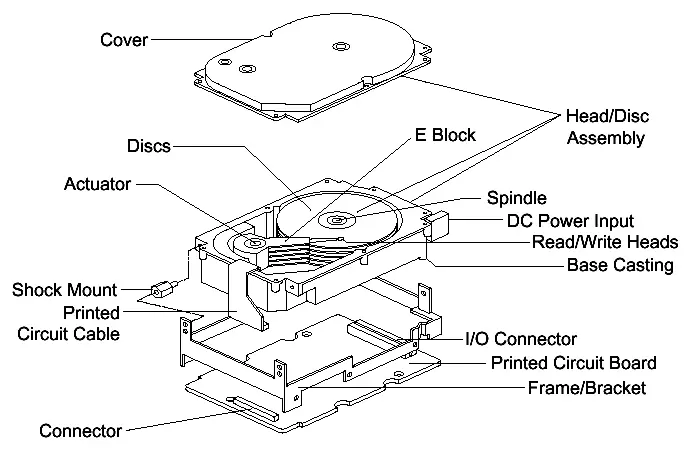
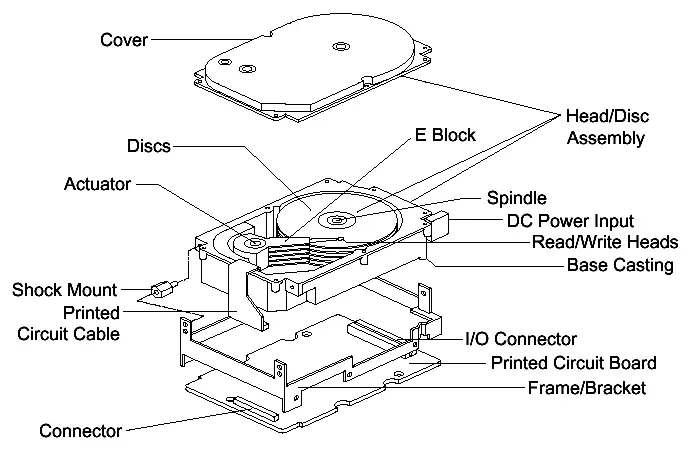
Parts of HDD:.
- Motors
- Platers
- Spindle stem
- HEAD
- Head actuator or voice coil
- Types of motors
- Spindle motors
- Stepper motor
- Formula to find the capacityof disk:
- Capacity = no. Of head x no. Of cylinder x
- No. Of sector x no. Of bytes per sector
Hard Disk Mechanism
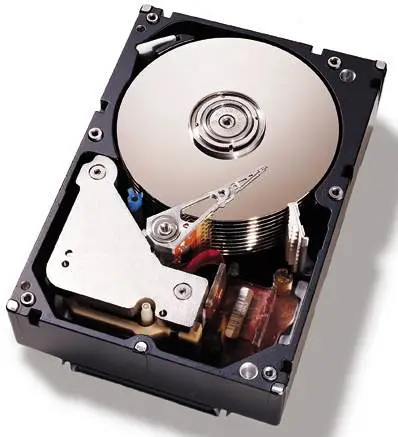
- A flat, round disk called platters is used in a hard disk
- The platters are loaded on a spindle.
- Spindle motor spins the platters.
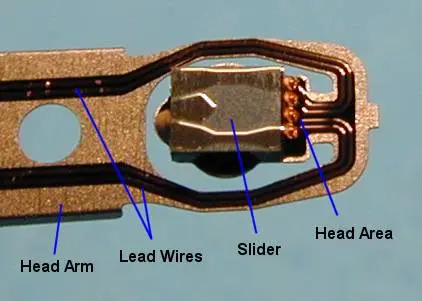
- Electromagnetic read/write devices called heads are mounted onto sliders.
- Each platter has two heads.


Geometry of Hard Drive
- Cylinders
- It is a set of all platters.
- Heads
- It is used to read data from the hard disk Drive’s disk platters Sectors per Track
- A track is a one ring of data on single side Tracks are divided into many sectors.
- Write pre-compensation
- Used to adjust the smaller tracks

Platters
- This platter is made up of substrate material, which gives structure and rigidity
- Platters are physically connected in the middle and driven by the spindle motor.
- Hard Disk Read/Write Heads
- The hard disk drive read/write heads act like an interface between the magnetic media and the part of the hard disk.
- Heads are joined to the head actuator move across the disk.
- Landing-Zone
- When the system is turned off, the BIOS should send the heads of hard disk to the cylinder where there is no data.
Types of Read or Write Heads
- Ferrite Head – It is used for magnetic recording.
- Metal in Gap Head (MIG) - A metal substance has been filled in the gap, and increases the resistance of magnetic saturation.
- Thin Film Head - This head floats closer to the disk than the other heads.
- Magneto Resistive Head - The MR head can change resistance.

Giant Magneto Resistive Head (GMR)
- It will work on multilayer of materials dumped in it.
- Head Actuator Mechanism
- Stepper motor actuators is an electrical motor ` that can step from location to other, with click-stop positions Voice Coil Actuator
- It is used to shift the head arms in and out .
- It has a special guidance system


- Spindle Motor
- The spindle motors are directly connected to the hard disk platter. It helps to spins the platters Logic Board (s)
- The logic boards have Electronics that control the drive’s spindle and head actuator systems.

Data Read / Write Operation in HDD
- The data is recorded on the magnetic tracks of a hard disk drive.
- Each track is divided into number of sectors.
- Data is pressed on each sector.
- Microcomputers’ hard disk drives are following the soft sector format.
- In the latest soft sector format, the track number, head number and sector number is written on each sector’s ID field.
- Hard disk heads convert electrical signals to magnetic signals and magnetic signals to electrical signals.
- By using encoding method, the stored data has been recorded onto the hard disk.
- This encoding method translates zeros and ones into patterns of magnetic flux reversals.
Other Information
- Sector Transfer Mode
- Programmed mode
- In this method the CPU is responsible of data transfer.
- Interrupt mode
- The CPU does data transfer but unlike previous method it is not responsible for checking if the device is read with a data byte.
- DMA mode
- DMA controller is responsible for data transfer.
- IO Address
- Devices use memory location for interfacing with the computer. A typical hard disk controller uses 1F0-1F7h I/O port.
- Interrupt Request (IRQ)
- It permits a hardware device to look inside the computer. When the device need attention, IRQ makes direct line to the microprocessor. 14 is the IRQ of HDD.
- DMA Channel
- Without CPU interference, the DMA controller transfers data from a drive to the computer’s memory.
- Low level formatting
- The disk’s tracks are divided into a specific number of sectors. LLF is most important for the proper operation of the drive.
- Partitioning
- The hard disk drive can support separate file systems by creating a partition on a hard disk drive.
- High level formatting
- The operating system marks the structures essential for managing files . High-level formatting is the creation of a table of contents for the disk
- Cluster
- Grouping sectors into larger blocks are called clusters .
- Master Boot Record (MBR)
- The location of the master boot record is cylinder 0, head 0, and sector 1.
- DOS Boot Record (DBR)
- In the beginning of the boot drive the DOS boot record will load .
- Boot Sector
- The two tasks of boot sector is to load in the operating system and to inform the user information about the disk.
- File Allocation Table
- The FAT has entry for each cluster, which describes how the file has been used, and which files are free for use.
- Root Directory
- FAT file system uses root directory to format disk.
- Data Area
- The content of the files are stored in data area.
- Disk Cleanup
- Disk Cleanup will examine the selected drive to decide the amount of space that can be freed. If the drive investigation is completed, a list of file types will be presented for selection. Disk Cleanup permits to review the files that can be deleted.
- Drive Fragmentation
- From the menu bar Start > Programs >
- Accessories > System Tools. Select the drive to defragments and click on the Analyze button Disk Compression
- The methods of compressions are:
- Utility based Compression
- Operating System File Compression
- Volume Compression
Small Computer System Interface
- Introduction
- Small Computer System Interface (SCSI) is a general purpose interface for connecting different types of devices.
- It is used to connect high speed hard disk drives for better performance in computers like Network servers.
- It can support a maximum of 7 or 15 total devices.
SCSI interface Features
- Performance
- Supports data transfer rate up to 320 MB/second.
- Connectivity
- Provides connectivity for internal and external SCSI devices.
- Compatibility
- It is compatible with the older peripherals.
- Reliability
- Most reliable interface when considering the data integrity, component failure
SCSI Standards and Types
- SCSI Standards
- SCSI -1
- This standard defines only the fundamental SCSI features and transfer modes.
- SCSI-2
- The main feature of this standard was to standardize the SCSI commands.
- SCSI-3
- The different features are grouped under three different categories Commands Protocols connectors
Types of SCSI
- Types of SCSI
- Regular SCSI (SCSI-1) .
- Wide SCSI
- Fast SCSI
- Fast Wide SCSI
- Ultra SCSI
- Ultra3 SCSI
- Serial SCSI .
- Internet SCSI (iSCSI)
SCSI Standards and Types
- Some of the SCSI interfaces and the speed supported by them.
- The table below compares the different server technologies
| Type | Speed | Peripheral Connection |
| SCSI-2, Fast SCSI (8-bit Narrow) | 10 MByte/sec | Scanners, Zip drives, and CD-ROM |
| Ultra SCSI (8-bit Narrow) | 20 MByte/sec | CD-R, CD-RW, tape, removable storage (Jaz), and DVD drives |
| Suitable for | Benefits | |
| SATA | Entry-level to mid-range servers | Performance of first-generation Expected low cost, but still an emerging technology |
| Fibre Channel | Server-to-server, campus networks | Performance is 200 MByte/sec Hard drive reliability |
SCSI Interface Components
- SCSI Bus
- It is a parallel I/O bus used for interfacing different peripheral devices.
- SCSI Host Adapters
- It is an additional Special card and is an interface between a SCSI bus and the PC.


- SCSI Connectors
| Connector Name | Pins | Device | Figure of connector |
| Ribbon IDC 50 | an internal 50-pin connector | hard drives, CD drives, etc. | |
| Centronics | 50-contact connector | scanners and tape drives | |
| DB-25 SCSI connector | external 25-pin connector | Zip drives, scanners, and many Mac devices | |
| 50-pin DB-50 | external 50-pin connector | Sun workstations |
SCSI cables
- The internal cables and external cables are the two types of SCSI cable.
- The internal cable does not possess any risk from external components like the electromagnetic and radio frequency noise.
- The external cables must be designed in such a way that the data traveling through the cable is safe.
- The external SCSI cable looks like the one shown below.

SCSI Configuration
- Installing SCSI hard Disk
- Set the jumpers
- Set the SCSI ID
- Configure Termination
- Set up the terminator power
- Attach cables and mount the drive
- Partition and format the drive