
A computer is a machine that can be programmed to carry out sequences of arithmetic or logical operations automatically. Modern computers can perform generic sets of operations known as programs.
Computerfundamentals
“All of us do not have equal talent. But, all of us have an equal opportunity to develop our talents.” – A.P.J. Abdul Kalam….
C O M P U T E R
- C - Commonly
- O - Operated
- M - Machine
- P - Particularly
- U - Used in
- T - Technical Or Trade
- E - Educational And
- R - Research
Computer:
- A computer is a machine that can be programmed to carry out sequences of arithmetic or logical operations automatically. Modern computers can perform generic sets of operations known as programs.
- Computers can be classified in a number of different ways, including:
- By architecture:

Analog computer:
- A computer that operates with numbers represented by directly measurable quantities (such as voltages or rotations).
- Analog computer or Analogue computer is a type of computer that uses the continuously variable aspects of physical phenomena such as electrical, mechanical, or hydraulic quantities to model the problem being solved. In contrast, digital computers represent varying quantities symbolically and by discrete values of both time and amplitude
- Digital computer
- A computer that performs calculations and logical operations with quantities represented as digits, usually in binary number system.
- An electronic computer in which the input is discrete rather than continuous, consisting of combinations of numbers, letters, and other characters written in an appropriate programming language and represented internally in binary notation
Hybrid computer:
- A hybrid computer is a computing system that combines both digital and analog components.
- A hybrid computer is a term used to describe a thin client computer that uses a hard drive, but also relies on programs ran from a server.

Super Computer:
- Computers used at Organizations dealing with Weather forecasting, Quantum Mechanics, Climate research, etc., where high level of performance has to be justified are called Super Computers.
- Mainframe Computer:
- Computers used by large Organisations to manage bulk data are called Mainframe computers. Main functions of such type include managing customer statistics, census and other heavy data in a single device. For example, the system used at Trading companies.
Micro Computers (Personal Computer):
- A relatively inexpensive and small computer comprising a microprocessor and a Central Processing Unit (CPU) is called a Microcomputer. Such computers are made with minimal circuitry mounting over a single circuit board. Examples include Desktop, Laptop, etc.
- Mini Computer:
- Developed in the mid-1960s, Mini computers are comparatively smaller than mainframe computers. They were developed keeping in consideration human interaction, control instrumentation and were cost-effective. For example Smartphones, iPads, etc.
Central Processing Unit(CPU)
Processor
Processor is known as “Microprocessor“, and it likes as small type of chip that is placed in the computers and another electronics components. Processor can manage all instructions such as arithmetical, logical, input/output (I/O) and other basic instructions, which are created by hardware or operating system. Its main job role is to obtain input from input devices and then produce the accurately result on the output devices. Now these days, more advance processors are available in the market, which are capable to control trillions of instructions in per second.
Memory
Memory Unit
- Internal Memory:
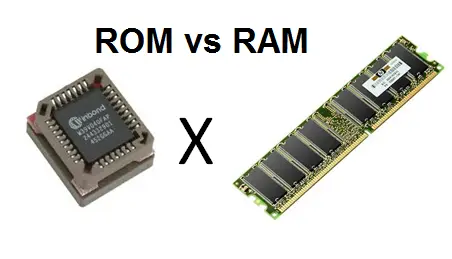
- Internal memory typically refers to main memory (RAM), but may also refer to ROM and flash memory. In either case, internal memory generally refers to chips rather than disks or tapes.
- Types of Internal Memory:
- RAM
- ROM
External Memory
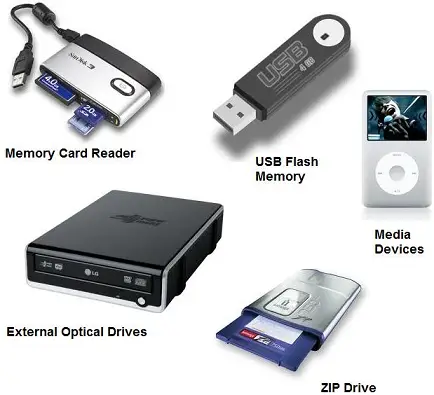
- External media is also known as auxiliary memory or secondary storage.
- Example:
- External hard drives,
- USB drives like Pen drive,
- Blu-rays, DVDs and CDs

A computer system is divided into:
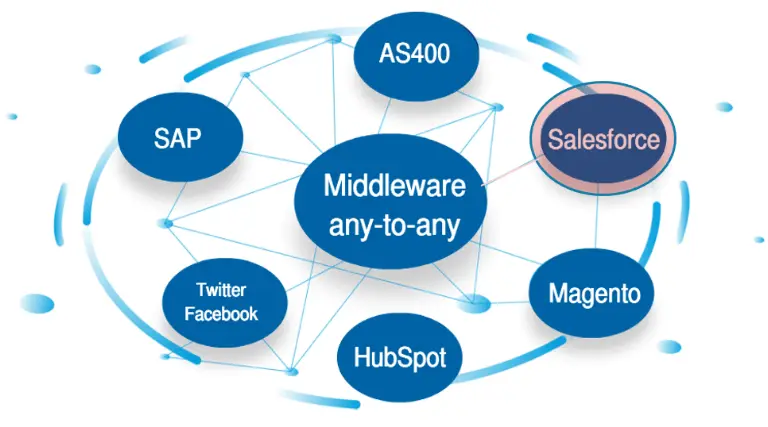
- Middleware(M/W)
- Hardware(H/W)
- Software(S/W)

Hardware (H/W)
Hardware is best described as any physical component of a computer system containing a circuit board, ICs, or other electronics. A perfect example of hardware is the screen on which you are viewing this page. Whether it be a monitor, tablet, or smartphone, it is hardware.
Without any hardware, your computer would not exist, and software could not be used. The picture is a Logitech webcam, an example of an external hardware peripheral. This hardware device allows users to take videos or pictures, and transmit them over the Internet.
Hardware Components
- C P U
- Monitor
- Keyboard
- Mouse
- Printer
- Speaker
Monitor
- A monitor is an electronic output device that is also known as a video display terminal (VDT) or a video display unit (VDU). It is used to display images, text, video, and graphics information generated by a connected computer via a computer's video card.
- Types Of Monitor
- Square Computer Monitors
- Wide Screen Monitors
- CRT (Cathode Ray Tube) Monitors
- LCD Monitors
- LED Monitors
- Plasma Monitors
- OLED Monitors
- Gaming Monitors
- High-Resolution Monitors
Keyboard
- A keyboard is a peripheral device that enables a user to input text into a computer or any other electronic machinery. A keyboard is an input device and is the most basic way for the user to communicate with a computer.
- Types of Computer Keyboard:
- Multimedia Keyboard
- Mechanical Keyboard
- Wireless Keyboard
- Virtual Keyboard,
- USB Keyboard
- Gaming Keyboard
- Bluetooth Keyboard
- Laptop Sized Keyboard
Mouse
- A computer mouse is a handheld hardware input device that controls a cursor in a GUI (graphical user interface) and can move and select text, icons, files, and folders on your computer.
- Types of Mouse
- Air mouse
- Cordless (Wireless)
- Foot mouse
- IntelliMouse (Wheel mouse)
- J-Mouse,
- Joystick,
- Mechanical, Optical
- Touchpad (Glide point)
- Trackball,
- TrackPoint.
Printer
- A printer is an external hardware output device that takes the electronic data stored on a computer or other device and generates a hard copy. Printers are one of the most popular computer peripherals and are commonly used to print text and photos.
- Types of printers
- 3D printer
- AIO (all-in-one) printer
- Dot matrix printer
- Inkjet printer
- Laser printer
- LED printer
- MFP (multifunction printer)
- Plotter
- Thermal printer
Speakers
- Speakers are one of the most common output devices used with computer systems. The purpose of speakers is to produce audio output that can be heard by the listener.
- Types of Speakers:
- Multimedia speakers
- Surround sound speakers
- Soundbar
- Home theater
- Internal speakers
- Portable speakers
- Buzzer
Software
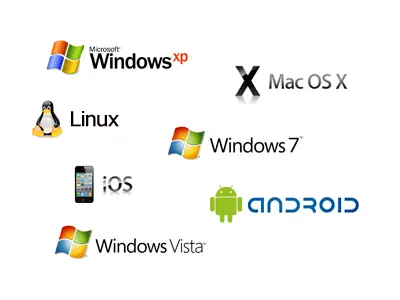
- Software is a set of instructions, data or programs used to operate computers and execute specific tasks. It is the opposite of hardware, which describes the physical aspects of a computer. Software is a generic term used to refer to applications, scripts and programs that run on a device. It can be thought of as the variable part of a computer, while hardware is the invariable part.
- The two main categories of software are:
- application software system software.
System software Vs. Application software
| System software | Application software |
| General purpose software that manages basic system resources and processes | Software that performs specific task to meet user needs |
| Written in low level assembly language e machine code | Witten in higher-level languages, such as Python and JavaScript |
| Must meet specific hardware needs interacts closely with hardware | Do not take hardware into account and doesn’t interact directly with hardware |
| Installed at the same time as the OS, usually by the manufacturer | User or admin installs software when needed |
| Runs any time the computer is on | User triggers and stop the program |
| Works in the background and users don't usually access it | Runs in the foreground and users work directly with the software to perform specific tasks |
| Software is necessary for the system to function | Needs system to run, isn’t needed for the system to function |
System software
System software is a type of computer program that is designed to run a computer's hardware and application programs....
Application Software
It is a type of software application that helps in the automation of the task based on the Users Input. It can perform single or multiple tasks at the same period of time. There are the different application which helps us in our daily life to process our instructions based on certain rules and regulations.
Middleware
Middleware is software that provides common services and capabilities to applications outside of what’s offered by the operating system. Data management, application services, messaging, authentication, and API management are all commonly handled by middleware.
Middleware helps developers build applications more efficiently. It acts like the connective tissue between applications, data, and users.
For organizations with multi-cloud and containerized environments, middleware can make it cost-effective to develop and run applications at scale.
The Internet
- The Internet is a vast, electronic network connecting many millions of computers from every corner of the world. The Internet is a publicly-accessible network that "consists of millions of smaller domestic, academic, business, and government networks“.
- Common services of the Internet are:
- World Wide Web (WWW),
- Voice Over IP (VoIP),
- Instant Messaging (IM),
- Streaming media, etc.
Thanks For Watching
- Presentation by:
- Bala Tharun.T